Download Binero (GBC - GameBoy Color)
For iOS, you will be prompted to install a configuration profile. This is safe and standard for adding web apps to your Home Screen.
This will add an icon for Binero (GBC - GameBoy Color) to your Home Screen. Tapping it will take you to an interactive loading page before launching the game.
If you wish to remove the profile later, go to Settings > General > VPN & Device Management, select the profile for Binero (GBC - GameBoy Color), and tap "Remove Profile".
Screenshots
Download Information
Binero (GBC - GameBoy Color) APK is available for Android devices. Download the latest version of the APK file and install it on your Android phone or tablet. Enjoy all features and updates directly from our app store.
Binero (GBC - GameBoy Color) IPA is available for iOS devices. Download the latest IPA file and install it on your iPhone or iPad. No Jailbreak Required Our store provides safe and fast downloads for all iOS users.
Get Binero (GBC - GameBoy Color) for your device now. Whether you need the APK for Android or the IPA for iOS, we have you covered with the latest version, free and secure.
About Binero (GBC - GameBoy Color)
Controls :
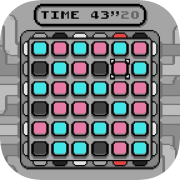
Arrow keys : Move on the boardA : Change tile's color (blue, pink or gray) (red cursor means the tile is from the beginning statement and can't be changed)B : Undo last change (only keeps last twenty changes, red cursor means there's no more history)Start/Select : Pause menu
The game has three simple rules :
There can't be three tiles of the same color aligned in lines or columns (Flag will be red if there's an error)Each line and column has three tiles of each color (Flag will be red if there's an error)Two lines can't have the same pattern, same for columns (Flags will be gray if there's a duplicate line or column)
Play with your friends!
The game has a password menu to select which board should be generated. Thus you can compete with anyone using the same code and find who's the fastest to finish it!
If you select "New Game" in the pause menu after entering a password, the same board will be used.
Designed to be fun to play!
When holding a direction button, the cursor will be pushed to the border. This mechanic is called the DAS (Delayed Auto Shift) and the options menu offers a way to modify its speed. May help going faster from a side to another!
Have fun playing!
(The game was fully developed by myself with GBDK 2020. Original concept is "Binairo" by Frank Coussement & Peter De Schepper. Thanks to everyone who helped