Download Daddy's Birthday
For iOS, you will be prompted to install a configuration profile. This is safe and standard for adding web apps to your Home Screen.
This will add an icon for Daddy's Birthday to your Home Screen. Tapping it will take you to an interactive loading page before launching the game.
If you wish to remove the profile later, go to Settings > General > VPN & Device Management, select the profile for Daddy's Birthday, and tap "Remove Profile".
Screenshots
Download Information
Daddy's Birthday APK is available for Android devices. Download the latest version of the APK file and install it on your Android phone or tablet. Enjoy all features and updates directly from our app store.
Daddy's Birthday IPA is available for iOS devices. Download the latest IPA file and install it on your iPhone or iPad. No Jailbreak Required Our store provides safe and fast downloads for all iOS users.
Get Daddy's Birthday for your device now. Whether you need the APK for Android or the IPA for iOS, we have you covered with the latest version, free and secure.
About Daddy's Birthday
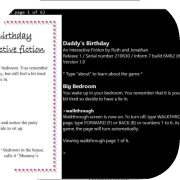
A short interactive fiction story written using Inform 7.
Tutorial
This interactive fiction story (text adventure game) takes place in various rooms, and involves interacting with the objects and characters in those rooms to progress towards the end of the story. Here are some of the main commands in this game:
Directions - navigate through rooms using compass directions (e.g. type "go northeast", abbreviated to "ne"), or "up"/"down". Once you have visited a room, you can return to it by typing "go to room name".
"Look" (abbreviated to "L") - to see the room description again.
"Examine something" (abbreviated to "x something") - to learn more about an object or character. This is the most commonly used command.
"Inventory" (abbreviated to "i") - to see a list of what you are carrying or wearing.
"Hello character" or "ask character about something" - to converse with a character.
Other sentences will depend on what you want to achieve (e.g. "put something on something else") or discover (e.g. "smell ...", "taste ...", "feel ..." or "listen to ..."). Try out any verb that seems relevant, and keep sentences short like these examples.
Enjoy your birthday!
Walkthrough
To use Ruth's story during the game, type "walkthrough".
Credits
Thanks to the following amazing beta testers: Auntie J; B Slade (beslayed); Edo; Garry Francis (Warrigal); Giannis Georgiou (GiannisG); Grandma and Grandpa; Mummy; Rovarsson; Ruth.