Download JAM: Crop METI
Screenshots
Download Information
JAM: Crop METI APK is available for Android devices. Download the latest version of the APK file and install it on your Android phone or tablet. Enjoy all features and updates directly from our app store.
JAM: Crop METI IPA is available for iOS devices. Download the latest IPA file and install it on your iPhone or iPad. No Jailbreak Required Our store provides safe and fast downloads for all iOS users.
Get JAM: Crop METI for your device now. Whether you need the APK for Android or the IPA for iOS, we have you covered with the latest version, free and secure.
About JAM: Crop METI
Welcome to Programming 101. In this class you'll learn to program a space probe. It will fly to Sol III (known as Earth by its inhabitants) and reconfigure a specific crop field. We do this to test the intelligence of those earthlings. Good luck!
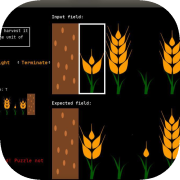
The crop field serves as input to the probe's program. It is a field comprised of 8 positions. Each position can be either a wheat plant in various growth stages or just the soil. The starting and ending position of each field will not contain a plant, i.e. soil. The highlighted position is where the probe could begin its execution.
The source code is comprised of multiple instructions. Each instruction is made up of 5 characters: CURRENT STATE CURRENT PLANT NEW PLANT MOVE DIRECTION NEW STATE. The starting state for the program is always A. If CURRENT STATE matches the program's current state and if CURRENT PLANT matches the plant/soil that the probe sees in its current field position then:
the probe will replace what it sees with NEW PLANTthe probe will be moved one position in the field according to MOVE DIRECTIONthe program's state is changed to NEW STATEremaining instructions aren't executed, instead a new cycle starts
There is one special state Terminate, T. If NEW STATE is set to it, the program will halt execution. It's recommended to switch to this T state when you have finished re-configuring the input field to the expected form. Each situation (STATE + PLANT) the probe encounters needs to be handled by some instruction, otherwise the probe will self-destruct.
Examples:
A50RA: If program's current state is A and if probe sees plant 5, then replace it with plant 0 (just the roots), move right and keep state to A.ASS.T: If program's current state is A and if probe sees no plant S (soil), then keep it as a soil, remain there (stay) and change state to T, which terminates execution.
That's it! Make us proud!
(Keep in mind this is only a prototype, made for LD52.)
The crop field serves as input to the probe's program. It is a field comprised of 8 positions. Each position can be either a wheat plant in various growth stages or just the soil. The starting and ending position of each field will not contain a plant, i.e. soil. The highlighted position is where the probe could begin its execution.
The source code is comprised of multiple instructions. Each instruction is made up of 5 characters: CURRENT STATE CURRENT PLANT NEW PLANT MOVE DIRECTION NEW STATE. The starting state for the program is always A. If CURRENT STATE matches the program's current state and if CURRENT PLANT matches the plant/soil that the probe sees in its current field position then:
the probe will replace what it sees with NEW PLANTthe probe will be moved one position in the field according to MOVE DIRECTIONthe program's state is changed to NEW STATEremaining instructions aren't executed, instead a new cycle starts
There is one special state Terminate, T. If NEW STATE is set to it, the program will halt execution. It's recommended to switch to this T state when you have finished re-configuring the input field to the expected form. Each situation (STATE + PLANT) the probe encounters needs to be handled by some instruction, otherwise the probe will self-destruct.
Examples:
A50RA: If program's current state is A and if probe sees plant 5, then replace it with plant 0 (just the roots), move right and keep state to A.ASS.T: If program's current state is A and if probe sees no plant S (soil), then keep it as a soil, remain there (stay) and change state to T, which terminates execution.
That's it! Make us proud!
(Keep in mind this is only a prototype, made for LD52.)
Information
Seller
seshoumara
Version
1.2
Released
Jan 09, 2023