Download Robotron's Inventory Quest
For iOS, you will be prompted to install a configuration profile. This is safe and standard for adding web apps to your Home Screen.
This will add an icon for Robotron's Inventory Quest to your Home Screen. Tapping it will take you to an interactive loading page before launching the game.
If you wish to remove the profile later, go to Settings > General > VPN & Device Management, select the profile for Robotron's Inventory Quest, and tap "Remove Profile".
Screenshots
Download Information
Robotron's Inventory Quest APK is available for Android devices. Download the latest version of the APK file and install it on your Android phone or tablet. Enjoy all features and updates directly from our app store.
Robotron's Inventory Quest IPA is available for iOS devices. Download the latest IPA file and install it on your iPhone or iPad. No Jailbreak Required Our store provides safe and fast downloads for all iOS users.
Get Robotron's Inventory Quest for your device now. Whether you need the APK for Android or the IPA for iOS, we have you covered with the latest version, free and secure.
About Robotron's Inventory Quest
Created in 72 hours by AlucardX60 (art), EmeliaKaylee (music), and Jellonator (programming), for Ludum Dare 42.
Controls
All of the controls are shown in the main menu, and can be configured for controller or keyboard. The default controls are listed below.
Move the cursor with the movement buttons (arrow keys). If you have an item grabbed, then moving the cursor will move the grabbed item.The grab button (c) will grab an item to move it.The rotate buttons (z and x) will rotate the grabbed item.The use button (space) will activate the selected item (must not be grabbed). This will equip/unequip armor and weapons, and consume consumable items, such as potions.The delete button (shift) will delete the selected item. This is useful for removing useless items, or clearing out inventory space.The pause button (p) will pause or unpause the game.
Further details (don't read if you want to figure things out on your own)
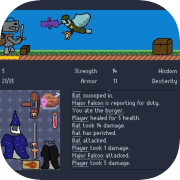
You have three equipment slots: one for armor, one for weapons, and a third slot for consumable items (they aren't used instantly and can only be used one at a time).
The strength stat determines how much damage your normal attacks will do. The wisdom stat determines how much damage spells will do. The armor stat determines how much damage will be negated from each enemy attack. The dexterity stat determines the player's attack rate.
The boomerang item hits a single enemy and picks up a single item off of the ground. The whip item hits the closest two enemies. The thunder spell will hit all enemies. All other attacks will hit only the closest enemy.